Bismillahirrahmanirrahim. With deep gratitude, Yayasan Ibrahim La Useng announces the launch of SUCI — Sistem Ujian Cerdas Ibrahim (Ibrahim Smart Examination System), a phone- and computer-based examination app owned by the foundation itself. During the 2026/2027 academic year, SUCI is being introduced step by step for examinations at MTs Ibrahim (Islamic junior high school), MA Ibrahim (Islamic senior high school), and Pondok Pesantren Tahfizhul Qur'an (PPTQ) Ibrahim, our Qur'an memorization boarding school: from daily quizzes, mid-semester and end-of-semester assessments, to boarding-school and diniyah (religious studies) examinations.
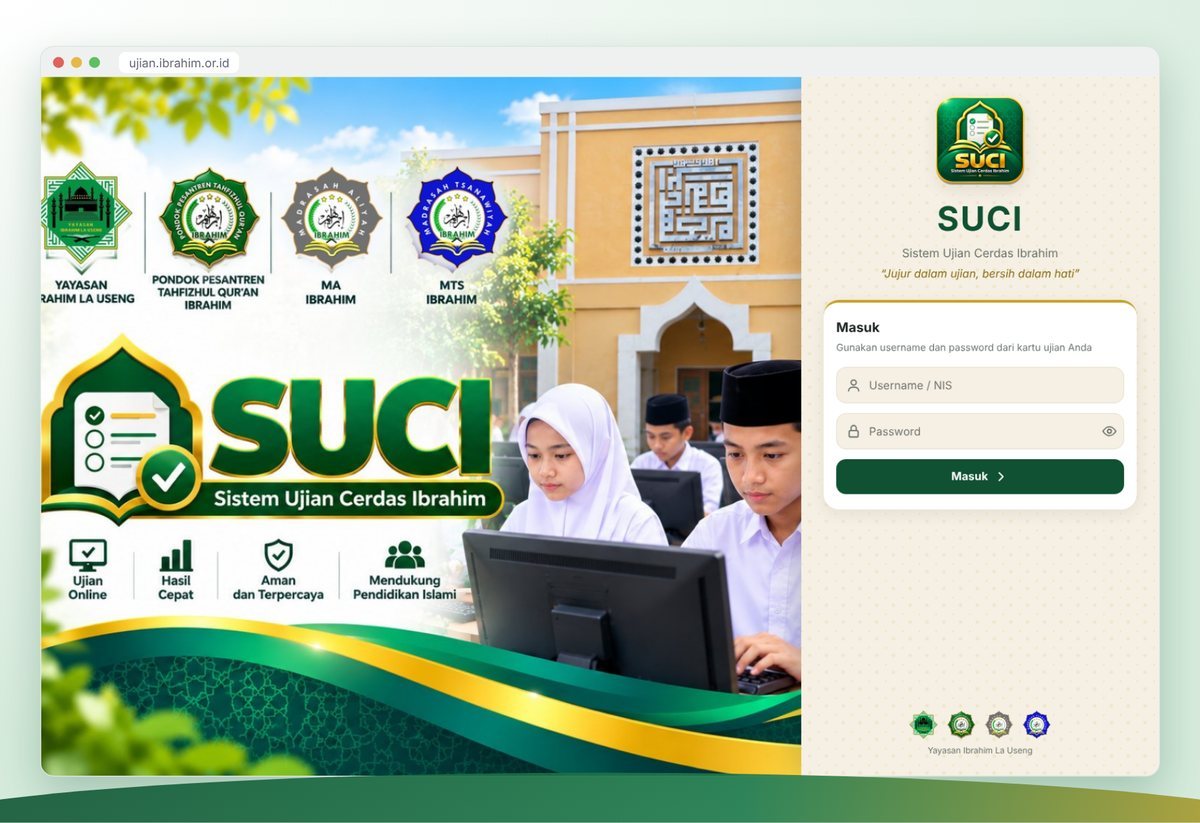
SUCI can be accessed at ujian.ibrahim.or.id. This article explains in full what SUCI is, why we built it, how it works for students, santri (boarding students), teachers, and invigilators, and the values we hope to instill through every examination. We hope parents and guardians, our asatidz (teachers), and the wider community will understand this new step and support it.
Why We Built SUCI
For the past several years, our madrasahs have used computer-based testing (CBT). It has proven helpful: less paper, faster results, and teachers no longer spend their nights marking hundreds of multiple-choice answer sheets. Until now, however, the application we used was a third-party service rented every year.
Over time, we felt several limitations. First, the rental fee recurred every year, even though those funds could be redirected to other educational needs. Second, examination data and student grades were stored on someone else's server, so the foundation did not have full control over our own children's data. Third, general-purpose apps do not always fit the needs of a pesantren: Arabic questions written from right to left, tahfizh halaqah (Qur'an memorization circle) examinations, santri who are also madrasah students, and terms and customs specific to boarding-school life.
SUCI was born from these needs. It was built specifically for the extended family of Yayasan Ibrahim La Useng, installed on the foundation's own server, and designed so that teachers already familiar with the previous CBT app would not have to learn from scratch. The workflow and terms feel familiar, while the appearance, features, and way of working are tailored to our own needs.
The Meaning Behind the Name and Motto
SUCI stands for Sistem Ujian Cerdas Ibrahim. Yet beyond the acronym, the Indonesian word "suci" means clean, pure, and unblemished. We chose this name deliberately as a reminder that an examination is, at its heart, a test of honesty. A high score means nothing if it is obtained by cheating, while a modest but honest score is far more valuable in the sight of Allah and far more useful for a child's future.
That is why SUCI carries the motto "Honest in exams, pure in heart." The motto appears on the app's login page, so every time students and santri are about to take an exam, they are reminded of the trust (amanah) they are carrying.
This message is in line with the command of Allah the Exalted in the Qur'an:
يَا أَيُّهَا الَّذِينَ آمَنُوا اتَّقُوا اللَّهَ وَكُونُوا مَعَ الصَّادِقِينَ
"O you who have believed, fear Allah and be with those who are truthful." (Qur'an, At-Tawbah 9:119)
The Messenger of Allah ﷺ also gave a firm warning against cheating:
مَنْ غَشَّنَا فَلَيْسَ مِنَّا
"Whoever cheats us is not one of us." (Narrated by Muslim)
Technology cannot replace faith and good character. But technology can help keep the examination environment orderly, fair, and clean. That is the role SUCI aims to play: supporting the character education that our asatidz have always taught in the classroom and in the halaqah.
One App for Three Institutions
Within Yayasan Ibrahim La Useng, many santri are also students at the MTs or MA. In the morning they study at the madrasah, while at other times they recite their memorization in the tahfizh halaqah. SUCI was designed with this reality in mind.
Each institution, namely PPTQ Ibrahim, MA Ibrahim, and MTs Ibrahim, has its own logo, color, and terminology within SUCI. The boarding school, for example, uses the terms "santri" and "pembina" (mentor), while the madrasahs use "student" and "teacher". A santri who is also an MTs student needs only one account. With that account, they can take madrasah exams in their class and boarding-school exams in their halaqah, without having to remember multiple usernames and passwords.
For teachers and mentors, each exam is created within their own institution. MTs teachers manage only the MTs exams they are responsible for, halaqah mentors manage boarding-school exams, and administrators can see everything. This division keeps management tidy and lets everyone focus on their own duties.
Key Advantages of SUCI
1. Exams Keep Running Without Internet
This is the advantage we cared about most. In many areas, including around us, the internet signal is not always stable. Exams that depend on the internet can stop halfway when the connection drops, leaving students anxious.
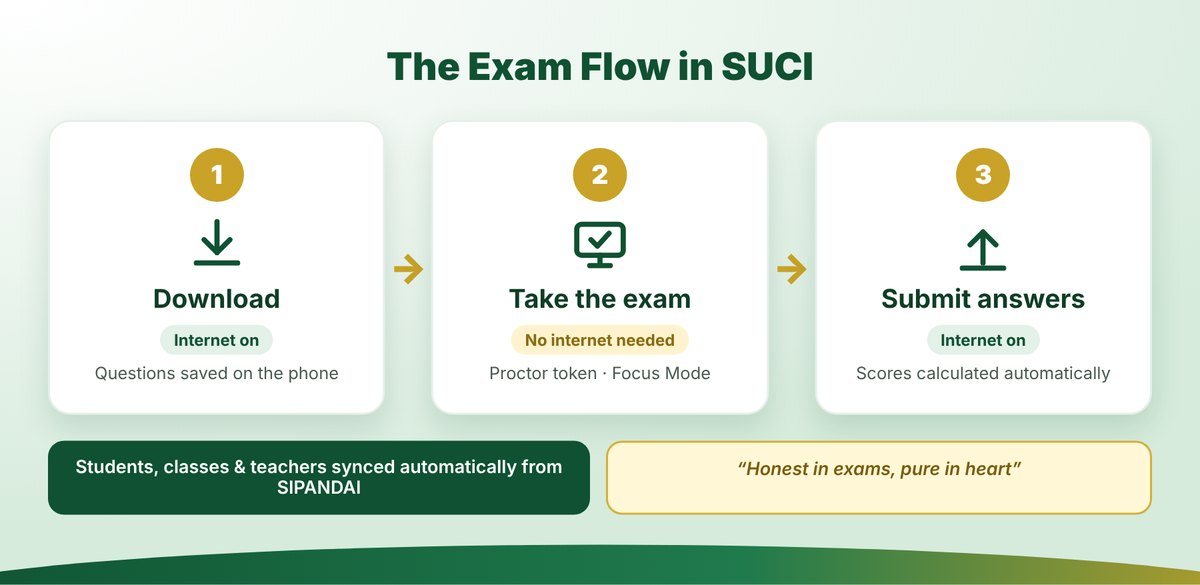
SUCI works differently. Students download the questions first while the internet is on, for example a few minutes before the exam begins. After that, the internet is switched off and the exam is taken entirely offline. Answers are stored safely on the phone. When finished, students turn the internet back on and submit their answers to the server. This way, signal problems no longer disrupt the exam, and very little data is used.
Even if a phone suddenly dies because its battery runs out, the answers already filled in are not lost. Once the phone is turned back on, the exam can be resumed from the last question with the invigilator's permission.
2. A Randomized Question Set for Every Participant
Teachers can prepare more questions than will be tested, for example 50 questions available while each participant answers only 40. SUCI automatically assembles a different set for each participant. The order of questions and the order of answer choices are also shuffled. As a result, two students sitting side by side will almost certainly receive different arrangements, so the temptation to copy naturally diminishes.
Teachers remain in control. Important questions can be marked as mandatory so they always appear in every set. Answer choices that must not be shuffled, such as "all of the above" or a numerical sequence, can also have their order locked.
3. Focus Mode and Invigilator Code
When the exam begins, SUCI enters Focus Mode: the screen goes full-screen and students are reminded not to switch to other apps. If a student leaves the app, opens social media, or splits the screen with another app, the exam is automatically paused. It can only be resumed when the invigilator comes over and enters a confidential Invigilator Code.
This makes students think twice before trying to open notes on their phone. At the same time, it remains humane: if a student presses a button by accident, the invigilator simply checks the situation and reopens the exam.
4. Detailed Violation Log
Every significant event during the exam is recorded with its time: when a student left the app, when the internet was turned on mid-exam, when a split screen was detected, and when the invigilator unlocked a pause with the Invigilator Code. Teachers and invigilators can view this log on the Participant Monitor page. The purpose is not to punish, but to give teachers an honest picture of how the exam went so they can guide students wisely.
5. Token and QR Code
Each exam has a six-character token announced by the invigilator right when the exam starts. The token can be displayed large on a projector screen together with a QR code, so students simply scan it with their phone camera. Without the token, downloaded questions cannot be opened, so no student can peek at the questions early.
6. Lightweight, Data-Saving, and Installable Like an App
SUCI does not need to be downloaded from the Play Store. Students simply open ujian.ibrahim.or.id in the Chrome browser and choose "Add to Home screen". SUCI then appears like a regular app on the phone, complete with the SUCI icon. It is small, friendly to basic phones, and because questions are downloaded only once, data usage is very low. SUCI can also be used on laptops and lab computers.
A Complete Range of Question Types
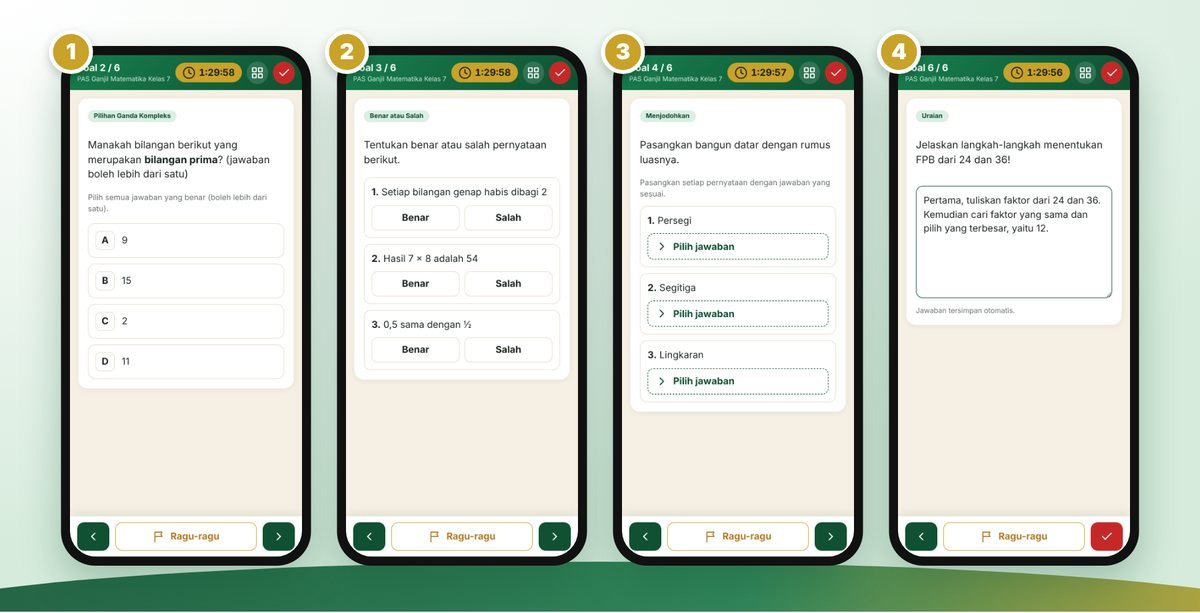
Today's curriculum calls for varied assessment, not just ordinary multiple choice. SUCI provides seven question types that can be mixed within a single exam:
- Multiple Choice: one correct answer, with choices that can be shuffled or locked in order.
- Complex Multiple Choice: more than one correct answer. Partial credit can be given according to the number of correct selections.
- True or False: several statements, each marked true or false.
- Category Multiple Choice: students sort statements into two to four categories.
- Short Answer: students type a short answer. Teachers can list several acceptable answers.
- Matching: pairing statements with the right answers, including distractor options.
- Essay: students type a long answer directly on their phone, and the teacher reads and scores it. For questions that need drawings or long calculations, teachers can choose to have answers written on paper.
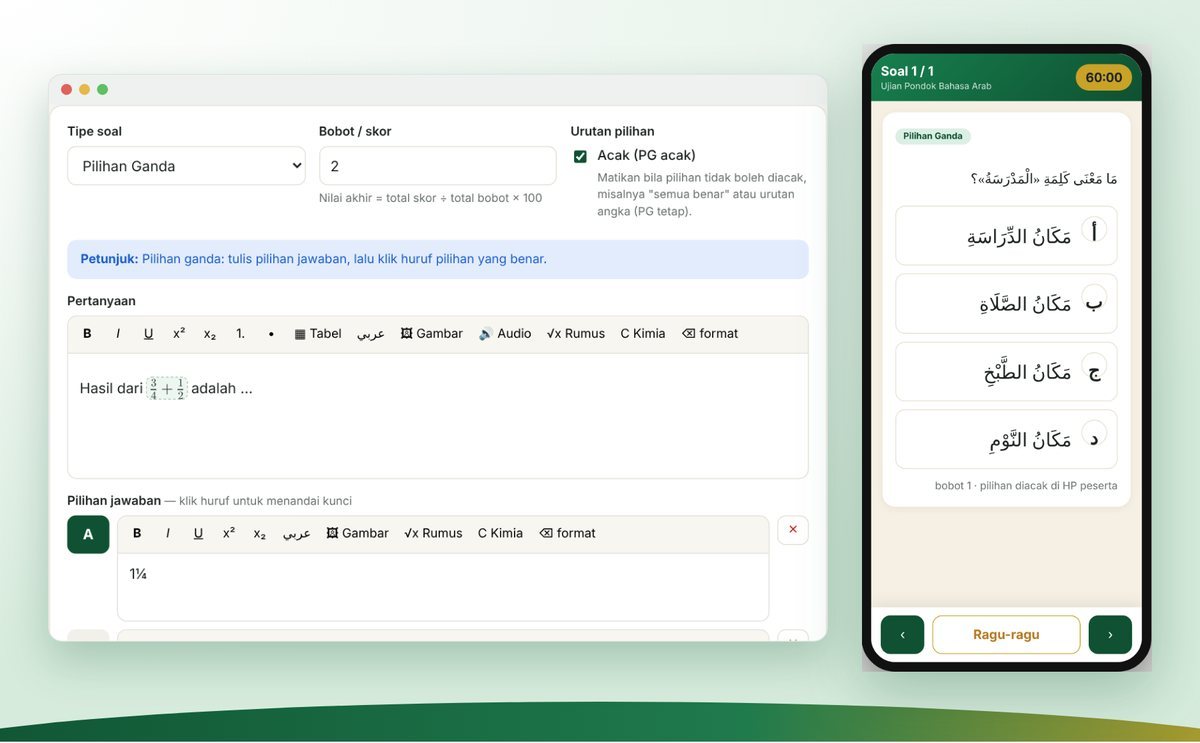
Math and Chemistry Formulas, Arabic, Images, and Audio
Mathematics and science teachers can write math formulas such as fractions, roots, and exponents, as well as chemical formulas such as H₂O and reaction equations, using dedicated buttons in the question editor. Formulas display neatly on students' phones, even offline.
For Arabic language, classical texts (kitab), and boarding-school diniyah exams, SUCI fully supports right-to-left Arabic script, including vowel marks (harakat), with answer choices labeled أ، ب، ج، د. Teachers can also insert images in questions and answer choices, as well as audio recordings for listening questions (istima'). Audio is saved to the phone when the questions are downloaded, so it can still be played with the internet off.
Exam Steps for Students and Santri
We designed SUCI so that the exam steps are as simple and memorable as possible. In short, there are three stages: Download, Take the Exam, Submit.
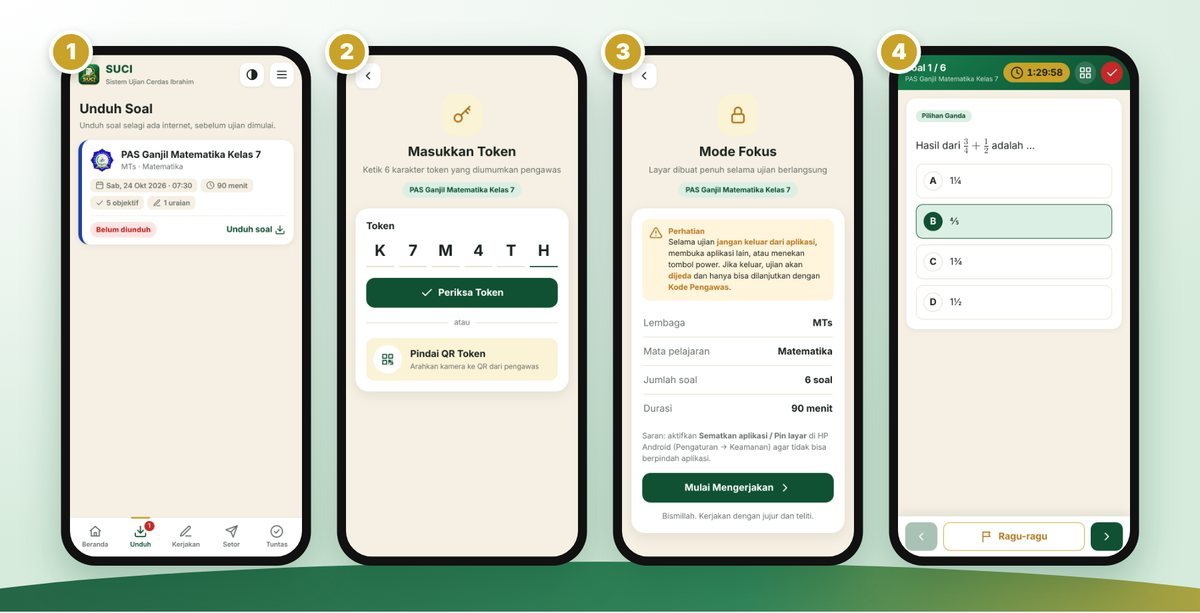
Here are the steps in detail:
- Log in. Open ujian.ibrahim.or.id and enter the username (student ID number) and password printed on the exam login card.
- Download the questions (internet on). Open the Download (Unduh) tab and tap the exam you will take. Wait for the message saying the questions have been downloaded. The exam then moves to the Work (Kerjakan) tab.
- Turn off the internet. Switch off mobile data and Wi-Fi, or enable Airplane Mode.
- Enter the token. In the Work (Kerjakan) tab, tap the exam and type the token announced by the invigilator, or scan the QR code on the screen.
- Focus Mode. Read the instructions, then tap Start (Mulai Mengerjakan). From this point on, do not leave the app.
- Work calmly. Move between questions with the arrow buttons. The grid button shows the list of question numbers, so you can see which ones are still unanswered. If unsure, flag a question with the Doubtful (Ragu-ragu) button so it is easy to review later.
- Finish. Once all questions are answered, tap the red check button and confirm. The answers are saved on the phone.
- Submit the answers (internet on). Turn the internet back on, open the Submit (Setor) tab, and tap the exam. When successful, the exam moves to the Completed (Tuntas) tab.
One important message for students and santri: do not log out before submitting your answers, because unsubmitted answers are still stored on the phone. SUCI will remind you if there are answers that have not been submitted.
Made Easy for Teachers and Mentors
We realize that teachers already carry a heavy workload. That is why SUCI aims to make their work easier, not add to it.
Create an Exam in Minutes
Teachers simply press New Exam, choose the institution and subject, fill in the exam name, duration, and minimum passing score (KKM), and select the participating classes. A list of madrasah and boarding-school subjects is already available, from Qur'an and Hadith, Aqidah and Akhlaq, Fiqh, and Islamic Cultural History to Mathematics, Science, Tahfizh, Tajwid, Nahwu, and Sharaf. If a subject is not yet on the list, teachers can type it in directly.
Upload Questions from Word or Excel
Teachers used to writing questions in Microsoft Word do not need to retype them. SUCI provides a Word template that can be filled in as usual: images are simply pasted, and formulas are created with Word's Insert → Equation menu. After uploading, all questions first appear as a preview so teachers can check them and choose which ones to save. An Excel template is also available for those who prefer it.
Question Bank, Phone Simulation, and Printing
Questions from previous exams can be reused through the Question Bank feature, so teachers need not start from scratch every semester. Before the exam starts, teachers can press Phone Simulation to see exactly how each question looks on a student's phone, including a dark theme option and an answer-key view. When needed, the question paper can also be printed in two versions: a student version without the key and a teacher version with the answer key, complete with the institution letterhead and academic year.
Quick Steps for Teachers to Prepare an Exam
For teachers using SUCI for the first time, here is the recommended workflow:
- Log in to ujian.ibrahim.or.id/admin with your SIPANDAI account.
- Create a new exam: choose the subject, fill in the exam name, duration, KKM, and participating classes, then press Save and continue to questions.
- Add questions: type directly in the editor, upload from Word or Excel, or pick from the Question Bank. The question-number list at the top makes it easy to move around and check which questions are complete.
- Check with Phone Simulation: view each question exactly as students will see it, and fix any cut-off text or images that are too small.
- Set randomization and number of questions: decide how many questions each participant answers and whether questions and choices are shuffled.
- Hand it over to the exam committee to open on the Exam Control page on exam day.
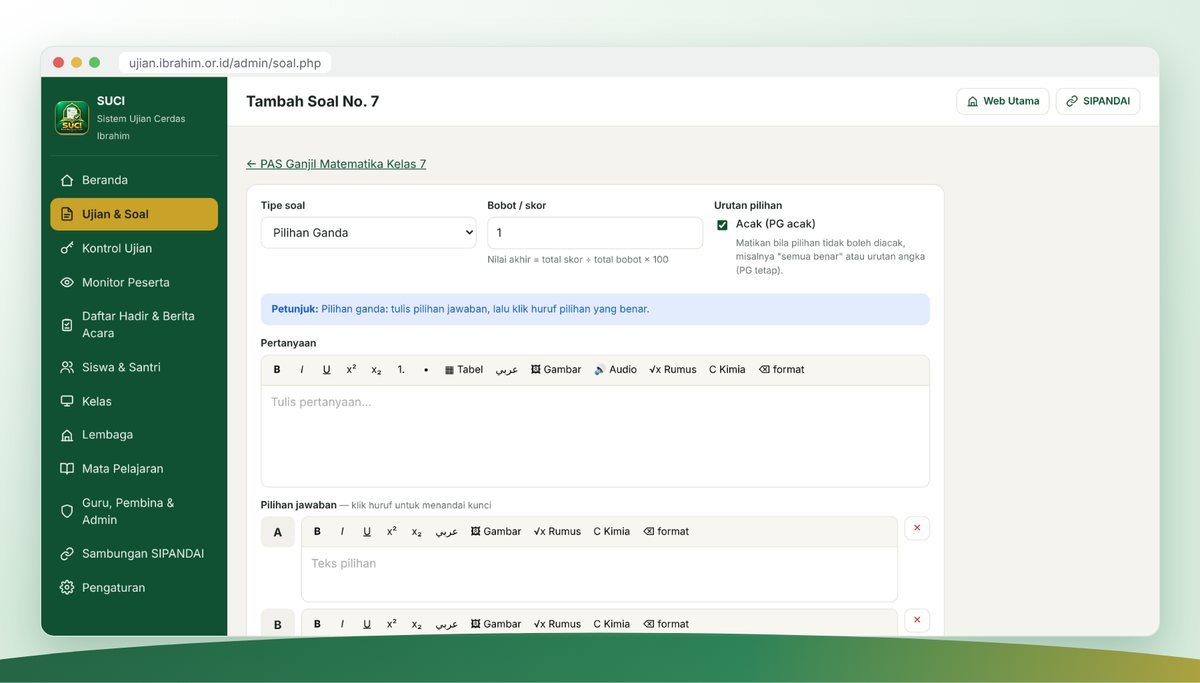
All of the steps above can also be done from a phone. The SUCI admin pages adapt to the screen size, so teachers can create or review questions between activities, even when away from their laptop.
Log In with a SIPANDAI Account
Teachers and mentors do not need to create a new account. They simply log in to SUCI with the SIPANDAI username and password they already use. If the password is changed in SIPANDAI, the change applies to SUCI immediately.
Orderly, Well-Documented Invigilation
A good exam is not only about the app, but also about its invigilation. SUCI provides a full set of tools for invigilators and exam committees.
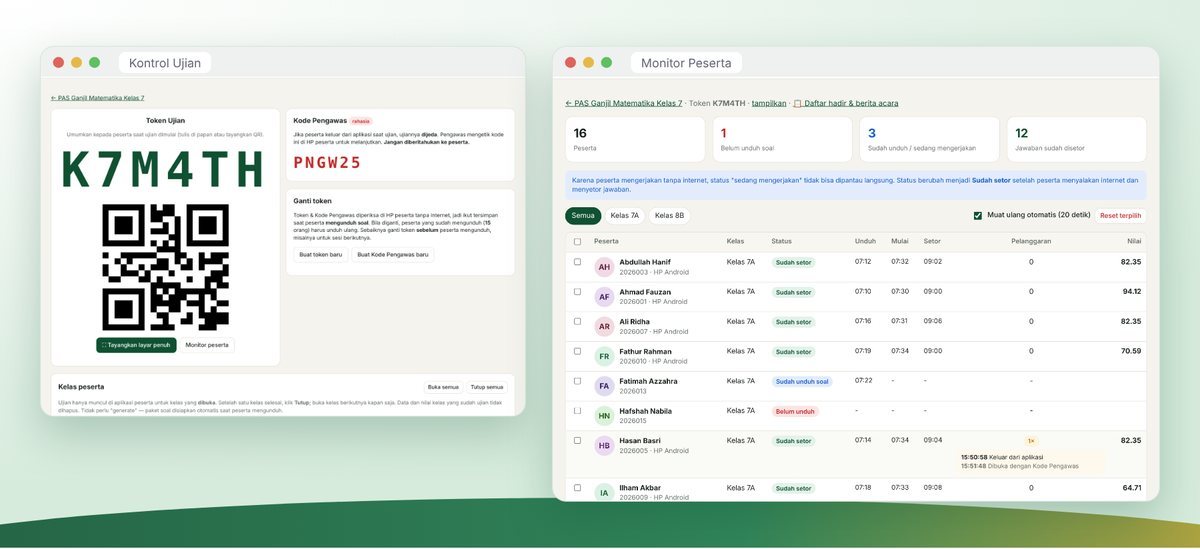
- Exam Control. The committee opens an exam for a particular class and closes it when finished. An exam can be opened for one class first, then the next, without affecting the previous class's data.
- Token display. The token and QR code can be shown full-screen on the exam room projector.
- Participant Monitor. Invigilators can see who has not downloaded the questions, who is ready to work, and who has submitted answers, along with the violation log and timestamps.
- Attendance List and Official Report. Participants who have downloaded the questions are automatically marked present. Invigilators only need to adjust those who are excused, sick, or absent, fill in notes on how the exam went, then print the attendance list and official report (berita acara) ready to be signed.
Division of Roles: Administrator, Operator, and Teacher
To keep work orderly and data secure, SUCI divides users into three roles:
- Administrators manage the entire app: institution settings, synchronization with SIPANDAI, user accounts, and all exams. Administrators can also view SUCI from the perspective of a particular teacher or student to help when problems arise, without needing to ask for their password.
- Operators or administrative staff help manage student and santri data in their institution, including viewing student login passwords and printing exam login cards.
- Teachers and mentors focus on teaching duties: creating questions, opening exams, invigilating, and grading. Teachers cannot see student passwords, which better protects the confidentiality of student accounts.
Each account's role is set automatically based on SIPANDAI data and can be adjusted by an administrator when needed. With this division, everyone has exactly the access their duties require, no more and no less.
Automatic Grading and Result Analysis
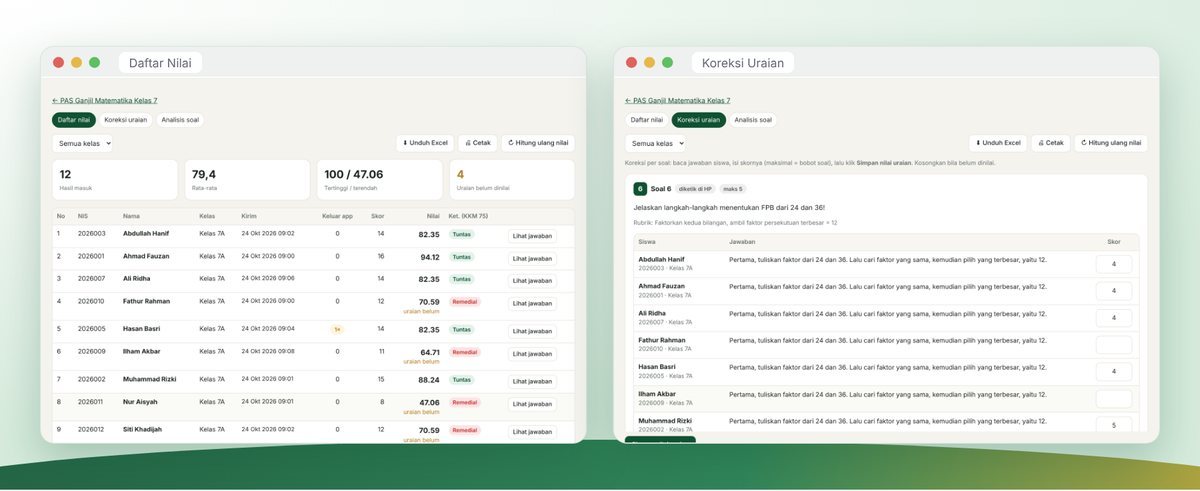
As soon as answers are submitted, SUCI immediately calculates scores for all objective question types. Teachers no longer need to check answer sheets one by one.
For essay questions, SUCI provides an Essay Grading page organized by question. Teachers read every student's answer to one question, enter the score, and save. This makes grading fairer and more consistent, because teachers compare answers to the same question one after another. Once essay scores are entered, students' final scores are updated immediately.
Every exam has a minimum passing score (KKM). In the score list, each student is labeled Passed or Remedial, so teachers can promptly plan remedial programs. All scores can be downloaded in Excel format for report cards.
SUCI also provides item analysis: the difficulty level of each question and the distribution of students' answers. From this, teachers can see which questions are too easy, too difficult, or need revision for the next exam. This is one of the greatest benefits of app-based exams: every exam becomes a learning resource for teachers and students alike.
Connected to SIPANDAI
Yayasan Ibrahim La Useng already has SIPANDAI (santri.ibrahim.or.id), a system for monitoring santri data and activities. SUCI is directly connected to SIPANDAI, so data never needs to be entered twice.
- Santri data, madrasah classes, and tahfizh halaqahs are pulled automatically from SIPANDAI. New santri can take exams right away. Santri who change classes follow their new class. Santri who are no longer active are automatically deactivated, while their past scores remain stored.
- Accounts for teachers, mentors, and education staff also follow SIPANDAI, including the institution where each person serves.
- Santri photos from SIPANDAI appear in the student app, on login cards, and on the Participant Monitor page, so invigilators can easily match faces to participants.
This connection is read-only: SUCI takes data from SIPANDAI but never changes data in SIPANDAI. This way, SIPANDAI remains the well-protected primary data source.
Benefits for the Environment, Time, and Finances
Moving from paper exams to digital exams brings tangible benefits. Every end-of-semester exam period usually requires thousands of sheets of paper for question papers and answer sheets. With SUCI, that need is greatly reduced. Paper is used only where necessary, for example for attendance lists, official reports, and essay questions that genuinely require writing sheets. This is a small part of our effort to care for the natural world that Allah has entrusted to us.
In terms of time, teachers no longer need to photocopy questions, distribute answer sheets, and mark them one by one. The time saved can be used for more important things: guiding students who have not yet passed, preparing better lessons, and attending to the character development of their students.
Financially, because SUCI belongs to the foundation, there is no longer an app rental fee to pay every year. Those funds can be redirected to other needs that santri feel directly, such as learning facilities and mentoring activities.
A Gradual Rollout
We understand that every change takes time to get used to. That is why SUCI is being introduced gradually. Teachers and mentors are first introduced to creating exams, uploading questions, and using Phone Simulation. Next, SUCI is used for small-scale exams such as daily quizzes and practice questions, so that students and santri become familiar with the Download, Take the Exam, Submit flow. Once everyone feels comfortable, SUCI will be used for larger exams such as mid-semester and end-of-semester assessments.
Throughout this rollout, every issue found in the field will be recorded and fixed. Several features now in SUCI, such as true-or-false, matching, short-answer, and essays typed directly on the phone, actually came from teachers' own suggestions. We are grateful for every piece of feedback, and the door to new suggestions will always remain open.
Security and Data Protection
Children's data is a trust. We strive to protect it seriously through the following measures:
- SUCI is installed on the foundation's own server, not on a third-party service.
- All access uses an encrypted connection (HTTPS).
- Teacher and administrator passwords are stored in one-way hashed form, so no one can read them.
- Access rights are divided by role. Teachers only see exams and students in their own institution, and student login passwords are managed only by administrators and operators/administrative staff.
- If a wrong password is entered repeatedly, the account is temporarily locked to prevent password-guessing attempts.
- During the exam, questions stored on the phone are locked with the token, so they cannot be opened before the scheduled time.
Exam Success Tips for Students and Santri
We want every student and santri to face exams calmly and confidently. Here are some simple tips:
- Arrive early and download the questions before the exam begins, while the internet in the exam room is still smooth.
- Charge your phone the night before. Bring a charger if the committee allows it.
- Close other apps before starting the exam, so notifications do not pop up and Focus Mode is not interrupted.
- Read each question carefully. Pay attention to the question type: whether there is only one correct answer, more than one, or whether items must be matched.
- Do the easy questions first. Flag difficult questions with the Doubtful button and come back after finishing the others.
- Watch the remaining time shown at the top of the screen. When time runs out, the answers you have filled in remain saved.
- Do not forget to submit your answers as soon as you finish and the internet is back on.
- Begin with a prayer and make the exam an act of worship. The best results come from sincere effort and an honest heart.
A Message for Parents and Guardians
The success of phone-based exams also depends on the support of parents and guardians. We kindly ask for your cooperation in a few simple matters:
- Make sure your child's phone is in good condition, fully charged on exam day, and has some free storage space.
- Make sure the Chrome browser on the phone is up to date.
- Help your child keep the exam login card safe, and remind them not to share their password with friends.
- Instill in your child that honesty is worth more than grades. An honest score reflects true ability, and that is where improvement can begin.
For santri who live in the dormitory and do not bring a phone, exams can still be held using devices provided by the boarding school or in the computer lab, according to the arrangements of each institution's committee.
Frequently Asked Questions About SUCI
Does SUCI have to be downloaded from the Play Store?
No. SUCI is opened in a browser at ujian.ibrahim.or.id. For convenience, choose "Add to Home screen" in Chrome so that SUCI appears like an app.
Does the exam require a constant internet connection?
No. The internet is needed only when downloading questions and when submitting answers. While working, the internet is actually turned off.
What if the phone dies in the middle of an exam?
Answers already filled in are saved on the phone. After turning the phone back on, open SUCI, and the exam can be resumed once the invigilator enters the Invigilator Code. The exam time keeps running according to the schedule.
What if a student forgets their password?
Students can contact their homeroom teacher, an operator, or the administrative office. They can look up the password in the student data and reprint the login card.
Can students see their scores?
Yes, if the teacher allows it. Teachers can choose whether scores are shown to students immediately after submission or announced later.
Do santri who are also MTs or MA students need two accounts?
No. One account is enough for both madrasah and boarding-school exams.
Can the questions leak before the exam?
Downloaded questions are locked and can only be opened with the token announced by the invigilator right when the exam starts. In addition, each participant receives a differently arranged question set.
Can SUCI be used on a laptop or computer?
Yes. On a computer screen, SUCI shows a wider, more comfortable layout, making it suitable for exams in the computer lab.
Who can be contacted if there is a problem?
Please contact the homeroom teacher, halaqah mentor, or exam committee at each institution. For general questions, you may also send a message through the contact page on this website.
Closing
The launch of SUCI is one small step in the larger endeavor of Yayasan Ibrahim La Useng to provide education that is high-quality, self-reliant, and grounded in good character. As a Qur'an memorization boarding school in Sidrap, South Sulawesi, that also oversees an Islamic junior and senior high school, we want technology to serve Islamic values, not the other way around. We want our children to grow into a generation of Qur'an memorizers who are technologically capable, and above all a generation that is honest wherever they are, whether watched or not.
We also extend our thanks to the asatidz, teachers, halaqah mentors, and education staff who took the time to try SUCI, give feedback, and remain patient during the adjustment period. Our thanks also go to the parents and guardians who always support every step of renewal within the foundation. Without everyone's cooperation, no app, however sophisticated, would bring any benefit. SUCI is only a tool; what makes it meaningful is our shared good intention and dedication in educating a Qur'anic generation that is honest and trustworthy.
Of course, SUCI will continue to be improved. We warmly welcome feedback from teachers, students, santri, and parents so that this app becomes ever more beneficial. May Allah the Exalted bless this endeavor and make it an ongoing charity (amal jariyah) for everyone involved.
Honest in exams, pure in heart.
Wallahul muwaffiq ila aqwamit thariq — and Allah is the One who guides to the most upright path.